

IC Helium
Lighten the load when it comes to Bulk-Editing your custom field data
Edit data in multiple fields across Manually Selected Entries, a chosen Date-Range, or All Entries instantly.
- Remove sensitive data - Clear customer details from old orders but keep financials.
- Update field values - Change pricing, status or any (supported) field across an entire year.
- Set defaults quickly - Enable free shipping on all products with one click.
- Lighten your database - Remove unnecessary data and keep your database small and manageable.

IC Helium home screen
What is the "IC Helium" ExpressionEngine add-on?
IC Helium lets you bulk-edit or clear field values across multiple channel entries simultaneously. Perfect for:
- GDPR compliance – Remove customer data from old orders.
- Content updates – Change specific field values for multiple Entries, across a date range.
- Database cleanup – Set defaults or clear unwanted data.

Preview field data changes
Comparison - IC Helium vs. EE Native Bulk-Edit Tool
ExpressionEngine has its own Bulk-Edit tool… so why do we need IC Helium?
| IC Helium | EE Native Bulk-Edit | |
|---|---|---|
| Edit standard fields | Status | Status Expiration Date Add Author Make Entry Sticky |
| Edit custom field types | Text Textarea Toggle Select dropdown Radio Checkbox URL Number Cartthrob Simple Price Rich Text Editor (clear data only) | n/a |
| Entry selection | All Date-Range Manually Selected | All Date-Range Manually Selected |
| Selection method | Method 1 - Within Add-On Method 2 - Push from Entry Listing | Method List entries > Select entries > Define rules > Go > |
| Save defined rules | Yes | No |
| Processing | Process as many as you want (batches of 50) with progress bar. Cancellable. Tested with 7000+ Entries without issues. | Processed as a 'whole'. Not cancellable. |
| Permissions | Controllable with usual Member Roles | Everybody |
Key Features
- Date Range filtering or Manually Select target Entries.
- Multiple native field types supported.
- Preview changes before processing.
- Permission-based security.
- Progress tracking with Cancel option.
- Cartthrob Order Channel personal data fields auto-highlighted.
Feature Roadmap
Ideas for further features coming soon (eventually!).
- Log - list of previous Processing runs.
- Reminder Emails - for future Processing runs (eg. annual clearance of customer data from old orders).
- Search and Replace - change all entries where Field 'X' has a Value of 'Y'.
Got any suggestions for useful features? Let us know.
Examples By Use Case
GDPR Data Scrubbing
Clear personal information:
- Text: Customer name, email, phone
- Textarea: Billing/shipping address, notes
- Toggle fieldtype: Newsletter subscription → Off
Cartthrob / Reinos Store / Ecommerce Price Updates
Update product pricing:
- CartThrob Simple Price fieldtype: Set to “0.00” or specific price
- Toggle fieldtype: "On Sale" → On
- Status: Products → "Active"
Seasonal Changes
Update content seasonally:
- Select fieldtype: Season → “Winter Sale”
- Checkboxes: Tags → "Holiday", “Clearance”
- Status: Old posts → "Closed"
Site Duplication
Clean unwanted data from old site:
- Text: META fields → Blank
- RTE fieldtype: Pages → Replace with dummy text
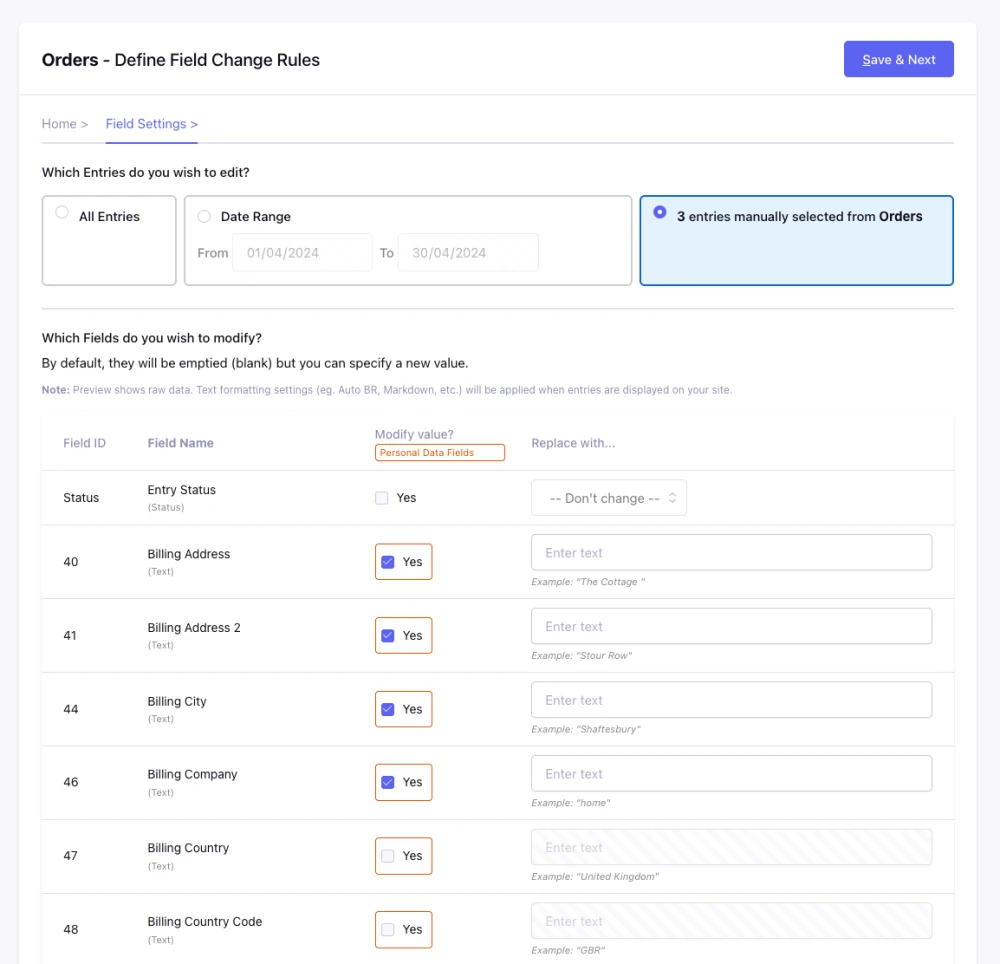
Field settings - set the data to be cleared or changed